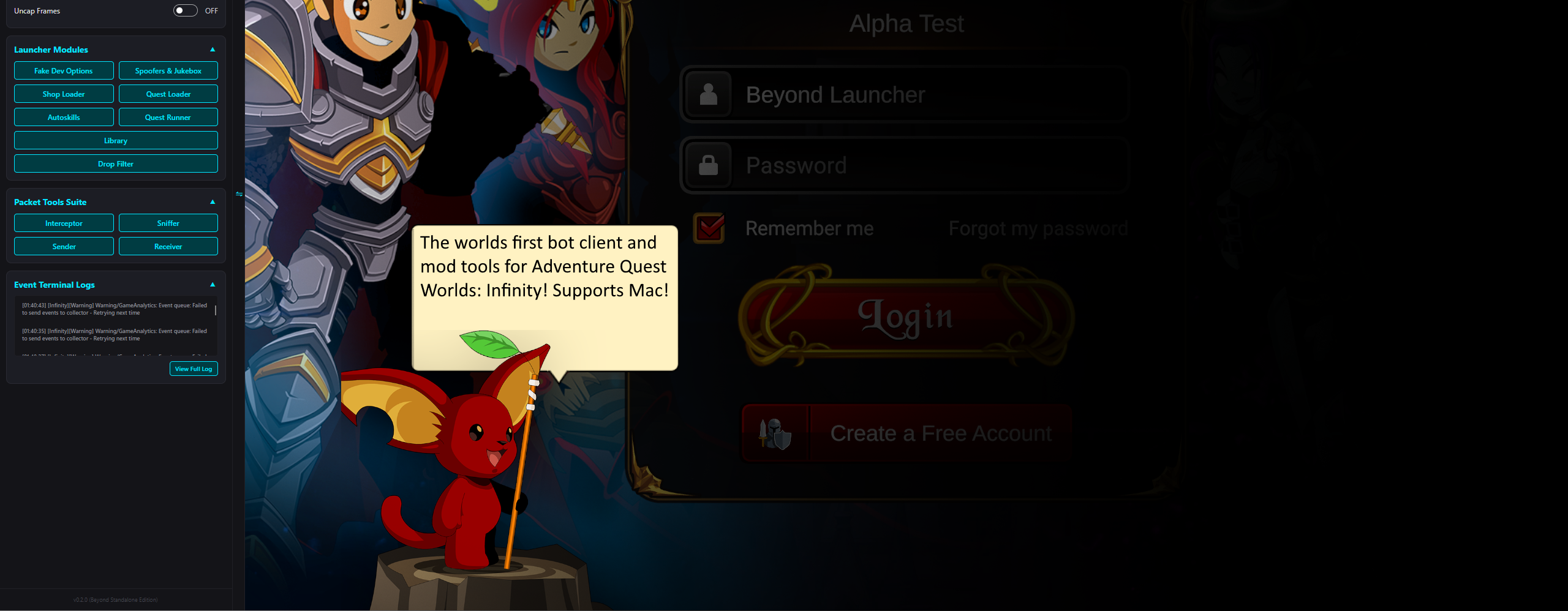
AQW Infinity Tooling

Beyond Standalone

Elevate your AdventureQuest Worlds Infinity gameplay with the worlds first multi-account manager, quest automator, and advanced modding tools embedded in a premium desktop launcher.

Download from github View Docs

Engineered For Multi-tasking

Multi-Account Sessions

Launch several accounts simultaneously, each running as an embedded Unity game in its own standalone session tab. Play and automate multiple sessions concurrently.

Dynamic Configurator

Store credentials and launch setups. Customize styling including active accent and danger colors directly inside the launcher to match your personal aesthetic preference.

Auto-Launch & Login

Bypass tedious typing. The launcher auto-fills credentials, skips the start splash overlays, and brings you directly to the server selection interface immediately.

Cosmetic Spoofers & Jukebox

Modify client-side names, genders, and gear visual appearances (including weapons, armor, helms, capes, and pets). The embedded Jukebox lets you override the active map's BGM with any soundtrack in the game's audio catalog.

Autoskills & Automation

Set up rules, timings, and combat rotation triggers. Build complex conditions to let the launcher execute optimal skill order sequences automatically in fights.

Packet Sniffer & Sender

Developer tools designed to capture outbound and inbound network packets. Intercept, modify, and replay payloads for analysis and network testing.

How Beyond Operates

Launcher Avalonia UI (.NET 10)

Manages the Windows environment host:

  • Spawns the game executable
  • Reparents the Win32 window handles into session tabs
  • Drives UI tools via per-session view-models
Named Pipe
BeyondAgent_<guid>
JSON Stream

BeyondAgent Harmony (.NET Standard 2.1)

Injects directly into AQW Infinity (Unity):

  • Patches Assembly-CSharp.dll
  • Applies local overrides & runs commands
  • Streams game state changes back to launcher

Each session utilizes a randomized pipe. The Launcher parses events and synchronizes panels, allowing instant reaction times without locking up the game's main thread loop.

Overview

Beyond is a custom client wrapper and mod combo engineered specifically to run AdventureQuest Worlds Infinity inside an advanced sandbox. Features range from local cosmetic spoofers to custom quest sequencers, allowing you to examine and play the game client with complete control.

Third-Party Disclaimer

This is a third-party tool intended for local, single-player experimentation, scripting analysis, and learning. Use it responsibly and at your own risk. Do not abuse features in public servers.

System Requirements

Before running Beyond, ensure your device matches the minimum and recommended platform requirements:

Windows OS Required for Win32 API window parenting mechanism. Windows 10/11 (64-bit).
macOS Support Supported via the macOS shell packaging script. Compiles launcher for Apple Silicon and Intel.
.NET 10 SDK Required to compile and run the Avalonia desktop launcher.
AQW Infinity Installed locally. The mod compiles against the game's assemblies inside the Managed folder.

Installation & Quickstart

Getting up and running with Beyond is straightforward. Prebuilt release packages are available on the GitHub Releases page, or you can compile it from source:

  1. Extract and Run: Download and extract the release ZIP for your OS, then start BeyondLauncher.exe (Windows) or open BeyondLauncher.app (macOS).
  2. Set Up Configurator: Navigate to the Configurator tab in the launcher UI.
  3. Point to Game: Set your Game Directory to the folder containing your AQW Infinity installation (the folder with the game executable and its *_Data directory), then add one or more account profiles.
  4. Launch Session: Select a profile and click Launch (or + Add Session). The launcher will automatically copy BeyondAgent.dll and 0Harmony.dll into the game's Managed folder, patch the game's Assembly-CSharp.dll (saving a backup named Assembly-CSharp.dll.bak on first run), and launch the game embedded directly inside a tab!

Building From Source

If you want to construct the launcher and agent binaries manually from the repository source code:

Method A: Automated Compilation Script (Recommended)

Run the automated build script in the repository root. It prompts for your AQW Infinity directory, compiles the launcher, builds the mod, and packages the outputs:

Windows (Cmd)
:: Run build script
build.bat
macOS / Linux (Shell)
# Execute build script
chmod +x build_osx.sh
./build_osx.sh

Method B: Dotnet SDK CLI (Manual compilation)

Execute compilation via standard .NET CLI by defining your game's data assemblies folder directly:

Bash / Shell
# Build solution pointing to game's Mono Managed folder
dotnet build Beyond.sln -c Release -p:AqwiManagedDir="<game_path>/<game_name>_Data/Managed"